
Android Photo Guide
Using Your Phone as a Camera
Did you know that we carry one of the most capable cameras ever made in our pocket every day. Modern Android smartphones combine camera hardware, advanced software processing, editing tools, and instant sharing in a single device.
This Android phone camera guide explains how your phone works as a photography tool, including how images are created, what camera features are available, and how photos can be edited, stored, and shared directly from your device.
Android phone photography means using your smartphone as a complete photography tool. Instead of relying on a separate camera and computer software, you can capture, improve, organize, and share photos directly from your phone.
For many people, a smartphone has replaced the need for a separate camera in everyday situations. Understanding how Android phones work as photography tools helps you get more value from the device you already use every day.
Key Takeaways
Android phones combine camera hardware and advanced software to produce high-quality photos.
Features like HDR, night mode, and AI scene detection help improve images automatically.
Your Android phone can capture, edit, store, and share photos from a single device.
Smartphone cameras have made photography more accessible and convenient for everyday use.
What is android phone photography?
Android phone photography refers to using an Android smartphone as a complete photography tool. Instead of relying on a separate camera and computer software, your phone can capture images, improve them using built-in processing, edit photos, store, and share them instantly.
Modern Android devices combine camera hardware, intelligent software, and online connectivity. This allows a single device to handle the entire photography process from capturing a photo to publishing it online.
How google android changed photography
Smartphones have dramatically changed how people take photos. Why? Because a camera is always available, important moments can be captured quickly. Built-in editing tools allow photos to be improved and edited immediately, making photography part of everyday communication.
For many people, their phone has become their most important camera.
Understanding camera systems
Android smartphones use compact but powerful camera systems designed to capture detailed images while fitting inside a small device.
Although phone cameras are physically smaller than traditional cameras, modern technology allows them to produce impressive results.
Several components work together to create the final image.
Camera sensors
The sensor is the most important component of a camera. It captures the light that enters through the lens.
When you take a photo, light passes through the lens and reaches the sensor. The sensor records this light as digital information, and the phone’s software processes that data to create the photograph you see on your screen.
Sensor size and quality influence:
- image detail
- low-light perforamce
- dynamic range
Even though smartphone sensors are smaller than those in many traditional cameras, advanced software processing helps improve the final image.
Lenses in android phones
The camera lens focuses light onto the sensor. Without a lens, the sensor would not be able to capture a clear image.
Different lenses allow your phone to capture different perspectives. The lens determines how much of the scene fits into the frame and how objects appear in the photograph.
Most Android phones include a primary lens designed for everyday photography and balanced lighting conditions.
Multiple camera systems
Many smartphones include several cameras on the back of the device. Each camera has a different lens or sensor that allows the phone to capture different types of images.
Common camera types include:
- wide lenses for everyday photography
- ultra-wide lenses for landscape
- telephoto lenses for zoomed images
The phone’s software can combine information from these cameras to improve image quality or simulate optical zoom.
Smartphone cameras vs traditional cameras
|
Feature |
Android Camera |
DSLR |
|---|---|---|
|
portability |
always with you |
must carry separately |
|
editing tools |
build into device |
requires computer software |
|
sharing |
instant online sharing |
requires transfering files |
|
convenance |
very high |
moderate |
How the android phone creates photos
When you press the shutter button on your phone, more happens than simply capturing a single image.
Modern smartphones rely on both hardware and software to produce the final photograph.
Computational Photography
Computational photography refers to the use of software algorithms to enhance images.
Instead of capturing just one photo, your phone may capture several images within a fraction of a second. These images are combined into one final photo.
By analyzing multiple frames, the phone can improve detail, reduce noise, and enhance colours.
This approach allows smartphones to overcome some of the physical limitations of small camera sensors.
HDR and Image Stacking
Scenes with both bright highlights and dark shadows can be difficult for cameras to capture accurately. HDR helps balance these lighting differences.
The phone captures several photos at different brightness levels and merges them together so both bright and dark areas retain detail.
Many Android phones activate HDR automatically when the camera detects challenging lighting conditions.
AI Scene Detection
Many modern smartphones use artificial intelligence to analyze what the camera is viewing.
The camera software can recognize scenes such as landscapes, food, people, or night environments.
After identifying the scene, the phone automatically adjusts settings such as exposure, colour, and contrast to produce a balanced photo.
Camera modes and features
Android camera apps usually include several photography modes designed for different types of scenes.
These modes help users capture images that might otherwise require manual adjustments.
Portrait mode
Portrait mode is designed for photographing people or subjects that should stand out from the background.
The phone analyzes depth information and creates a blurred background effect, helping the subject appear sharper and more prominent.
Night mode
Low-light photography can be challenging for small cameras. Night mode helps overcome this limitation.
When night mode is activated, the phone captures multiple frames and combines them to brighten the image and reduce noise
Panorama mode
Panorama mode allows you to capture wide scenes that extend beyond the limits of a single photograph.
The phone records a series of photos while you move the camera across the scene, and the software stitches them together into one wide image.
RAW photo capture
Some Android phones allow users to capture images in RAW format.
RAW files contain unprocessed data from the camera sensor, providing greater flexibility during editing.

Simple tips for better photos
Modern Android phones automatically adjust many camera settings, but a few simple habits can improve results.
Keep the lens clean.
Fingerprints or dust can reduce image sharpness. A quick wipe with a soft cloth often improves photo clarity.
Use natural light
Photos taken in daylight usually appear clearer and more detailed than those taken in dim lighting.
Hold the phone steady
Movement can cause blur, especially in low light. Holding the phone with both hands can help stabilize the shot.
Avoid digital zoom.
Digital zoom enlarges the image electronically and may reduce detail. Moving closer often produces better results.
Try different modes.
Portrait, night mode, and panorama are designed for specific scenes and can improve results when used appropriately.
Android photography workflow
|
Stage |
What Happens |
|---|---|
|
Capture |
Taking Photos using the camera |
|
Edit |
Adjust photos with app editing tools |
|
Store |
Saving images locally of in the cloud |
|
Share |
Sending or publishing photos |
Editing photos on your android
Taking a photo is only the first step. Android phones also include built-in editing tools that allow you to improve images directly on the device.
Editing photos on your phone
Most Android phones include editing features within the gallery or photo app.
Common adjustments include:
- cropping images
- adjusting brightness and contrast
- modifying colour balance
- strengthening photos
These simple adjustments can significantly improve how a photo looks.
Improving photos through editing
Editing allows you to refine an image after it has been captured.
Small adjustments can correct lighting, enhance colours, or remove distractions from the frame. Many of us now complete their entire editing process directly on their phones.
Managing and storing photos
As smartphone photography becomes more common, people often accumulate thousands of photos.
Local storage
Photos are typically stored directly on the phone in folders that can be viewed through gallery or photo apps.
Cloud backup
Cloud storage allows photos to be backed up online automatically. This protects images if a phone is lost or damaged and allows access from multiple devices.
Organizing photos
Photo apps help organize images using albums, search tools, and automatic grouping by date or location.
Sharing photos
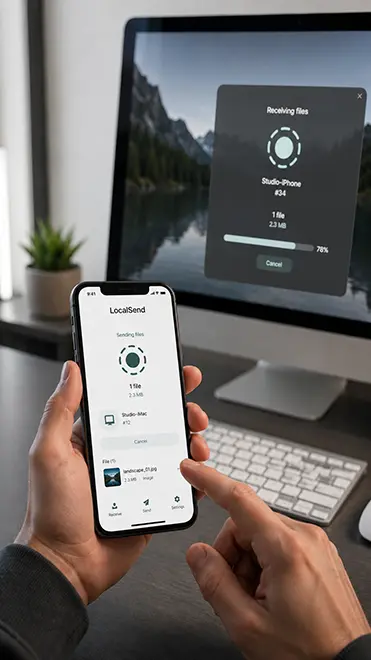
One of the biggest advantages of smartphone photography is the ability to share images instantly.
After capturing and editing a photo, it can be sent through messaging apps, email, or uploaded directly to social media, blogs, or online galleries.
Because the camera, editing tools, and internet connection are all on the same device, sharing photos becomes quick and convenient.
Real-World uses
We all know that photography plays an important role in everyday life, and with today’s phones it makes it easier to capture moments such as family activities, travel, and daily experiences. With your phone always nearby, it’s easy to document and share life as it happens.
Travel photography
Travelers often rely on their phones to capture landscapes, buildings, and experiences during trips.
Social media content
Many creators use smartphones as their primary photography tool because images can be captured, edited, and posted quickly.
Everyday documentation
Phones are commonly used to record daily life, including family events, work projects, and personal milestones.
Creative photography
Because the camera is always available, smartphones encourage experimentation with different angles, lighting conditions, and compositions.
Conclusion
Android phones have evolved into powerful photography tools that combine camera hardware, intelligent software processing, editing tools, and instant sharing in one device.
Technologies such as multiple lenses, HDR processing, and artificial intelligence allow smartphones to capture high-quality images in many situations. These features make it possible to take, improve, store, and share photos without needing separate cameras or complex software.
Because an Android phone can handle the entire photography workflow—from capturing a photo to publishing it online—it has become the most convenient camera many people use every day.
By understanding how your Android phone camera works and exploring its features, you can make better use of the powerful photography tool you already carry in your pocket