
Mobile Photo Editing Apps to Improve Your Photos
Smartphones have become the most common camera people use. Modern phones can capture high-resolution images, advanced HDR photos, and detailed portraits. Despite these improvements, most photos still benefit from some sort of editing.
This is where mobile photo editing apps become valuable tools for improving your photography.
Editing apps allow you to adjust lighting, improve colours, refine composition, and remove distractions directly on your phone. Instead of transferring photos to a computer, you can edit images immediately.
Many mobile editing tools now include features that were once available only in professional desktop software. Colour grading, selective adjustments, portrait retouching, and AI enhancements are now accessible on smartphones.
Whether you want quick improvements or more detailed adjustments, the right editing app can help you turn everyday photos into polished images ready to share online.
Key Takeaways
Editing apps allow you to improve smartphone photos quickly.
Most apps include tools for cropping, colour correction, and filters.
Many apps offer both free and premium versions.
Some tools focus on simple adjustments while others offer advanced editing controls.
Photo editing apps make it easy to prepare images for social media and websites.
Popular apps for editing photos on your phone
Many editing apps are available today. Each app offers different tools and features designed for different types of users.
Skylum Luminar Mobile
This app is known for its AI-powered tools that simplify complex edits on mobile devices.
Luminar Mobile allows you to enhance photos using automated adjustments for lighting, colour, and detail, while still offering manual controls for fine-tuning. It supports RAW editing and includes creative tools designed to improve images quickly.
Because of its AI-driven features, Luminar Mobile is a great option for photographers who want fast, high-quality results directly on their phone.
What Are mobile photo editing apps?
Mobile photo editing apps are smartphone applications that allow you to improve photos directly on your phone. These apps provide tools for adjusting exposure, colours, cropping, filters, and other image enhancements without needing a computer.
Many modern apps also include advanced features such as selective editing, AI enhancements, and portrait retouching.
Why editing photos improves photography
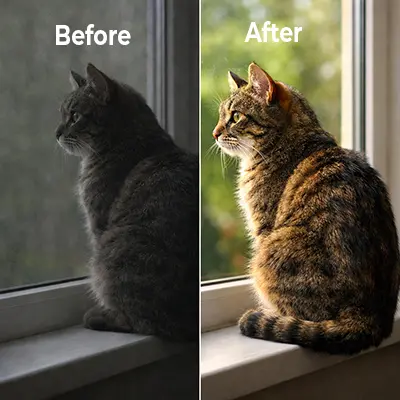
Taking a photo is only the first step in creating a great image. Even with advanced smartphone cameras, photos can sometimes appear too dark, too bright, or slightly flat. Editing tools help correct these issues and improve the final result.
Correcting Exposure and Lighting
Lighting conditions are not always perfect when taking photos. Images may appear too dark in shadows or overly bright in highlights.
Editing tools allow you to adjust brightness, contrast, shadows, and highlights. These adjustments help restore detail and balance the lighting in an image.
For example, increasing shadow levels can reveal hidden details in darker areas, while reducing highlights can recover detail in bright skies.
Improving Colour Balance
Colour plays an important role in photography. Lighting conditions can sometimes cause colours to appear dull or inaccurate.
Editing apps allow you to adjust white balance, saturation, and vibrance. These adjustments help make colours appear more natural or more vivid depending on your style.
Even small colour adjustments can make a noticeable difference in the overall appearance of a photo.
Enhancing Composition
Composition refers to how elements are arranged within an image.
Cropping tools allow you to remove distractions around the edges of a photo and focus attention on the main subject. Straightening tools can correct tilted horizons or uneven angles.
Improving composition helps create a cleaner and more visually balanced photograph.
Refining Image Details
Editing also helps refine the small details that improve photo quality.
Sharpening tools can enhance textures and edges, while noise reduction helps smooth grainy images taken in low light.
These adjustments help produce a more polished final image.
Editing does more than simply improve the appearance of a photo. It also helps photographers develop a stronger understanding of lighting, colour, and composition.
Editing does more than simply improve the appearance of a photo. It also helps photographers develop a stronger understanding of lighting, colour, and composition. When you adjust exposure, contrast, or colour balance, you begin to see how these elements affect the overall image.
Over time, your editing process helps you recognize similar issues when taking photos in the future. For example, if you frequently increase shadows in your edits, you may start paying closer attention to lighting conditions while shooting.
Editing also allows us to recover detail that may not appear obvious in the original image. Modern smartphones capture more image data than what appears in the initial preview. Adjusting highlights and shadows can reveal textures, colours, and details that were hidden in the original photo.
Another important benefit of editing is creative control. we as photographers can shape the mood of an image through subtle adjustments. Warmer colours can make a photo feel inviting, while cooler tones can create a calmer atmosphere.
These small creative decisions allow us to transform ordinary images into photos that better reflect our artistic vision.
Features available in photo editors
Most editing apps include a variety of tools that help improve images.
Filters and presets
Filters apply a predefined style to a photo with a single tap. They adjust colour tone, brightness, and contrast to create a specific visual effect.
Presets function similarly but allow photographers to fine-tune adjustments after applying them. Many photographers use presets to maintain a consistent editing style across multiple photos.
Basic editing tools
Most apps include essential editing controls such as:
- Cropping and rotating photos
- Adjusting brightness and contrast
- Controlling colour saturation
Changing Colour temperature
These tools help correct common problems and improve image quality quickly.
Selective editing tools
Some advanced apps allow selective adjustments. This means you can edit only specific areas of a photo instead of adjusting the entire image.
For example, you might brighten a subject’s face without affecting the background.
Selective editing helps create more precise results.
Types of photo editing apps
Different editing apps serve different purposes, depending on how you want to improve or transform your photos.
Beginner-Friendly editors
Beginner apps are designed for simplicity. They include quick filters and easy adjustments that allow users to improve photos with minimal effort.
These tools are ideal for casual photographers.
Professional editing tools
Professional editing apps include advanced controls for exposure, colour grading, and detail adjustments.
These apps allow photographers to make precise edits and are often used by enthusiasts or professionals.
Creative filter apps
Creative editing tools focus on artistic styles.
These apps include overlays, effects, and filters that dramatically change the appearance of a photo.
AI-Powered editing apps
AI editing tools automate many adjustments.
These apps can enhance lighting, improve colours, remove objects, and refine portrait photos automatically.
Comparison of popular photo editing apps
|
App |
Platform |
Free Version |
Best For? |
|---|---|---|---|
|
Lightroom Mobile |
iOS/Android |
Yes/Limited |
Advanced editing |
|
iOS/Android |
Yes/Limited |
Detailed control and RAW editing |
|
|
iOS/Android |
Yes/Limited |
AI powered editing |
|
|
SnapSeed |
iOS/Android |
Yes |
Powerful free editor |
|
PicsArt |
iOS/Android |
Yes |
Creative editing |
|
PixLR |
Ios/Android |
Yes |
Quick and simple edits |
|
Canva |
iOS/Android |
Yes |
Social media and design |
Free vs paid photo editing tools
Most mobile editing tools offer both free and premium versions.
Free vs Paid Photo Editing Tools
Free versions usually include basic features such as:
- cropping and rotating
- brightness adjustments
- colour controls
- simplified filters
Photographers who edit frequently may benefit from these additional tools.

How to choose the right photo editing app
With many editing apps available, choosing the right one can feel overwhelming. The best app often depends on your photography style and the type of edits you want to make.
Consider your editing experience
Some apps are designed for beginners and provide simple controls with quick filters. These apps allow users to improve photos with minimal adjustments.
Other apps offer advanced tools for colour grading, selective adjustments, and detailed editing. Photographers who want more control may prefer these more advanced tools.
Look for features that match your needs
Some apps are designed for beginners and provide simple controls with quick filters. These apps allow users to improve photos with minimal adjustments.
Other apps offer advanced tools for colour grading, selective adjustments, and detailed editing. Photographers who want more control may prefer these more advanced tools.
Test several apps
Many editing apps offer free versions, which makes it easy to experiment with different tools. Testing several apps helps you understand which interface and features feel most comfortable.
Once you find an app that matches your editing style, you can develop a consistent workflow for improving your photos.
Conclusion
Smartphones have made photography accessible to everyone, but editing remains an important step in creating high-quality images.
Mobile editing apps allow photographers to improve exposure, refine colours, enhance composition, and apply creative styles directly on their phones.
With many editing tools available, users can choose apps that match their skill level and editing needs. Some apps focus on quick improvements, while others offer professional editing capabilities.
By experimenting with different tools and techniques, photographers can significantly improve their smartphone photos and create images that look polished and ready to share