
ON1 Photo RAW Mobile Review for Phone and Tablet Editing
Bob Wild
Fine Art Photographer, Vancouver Island
Founder of Who Said Photography | 20+ years shooting | I try and test every tip on real shoots before it goes on the page
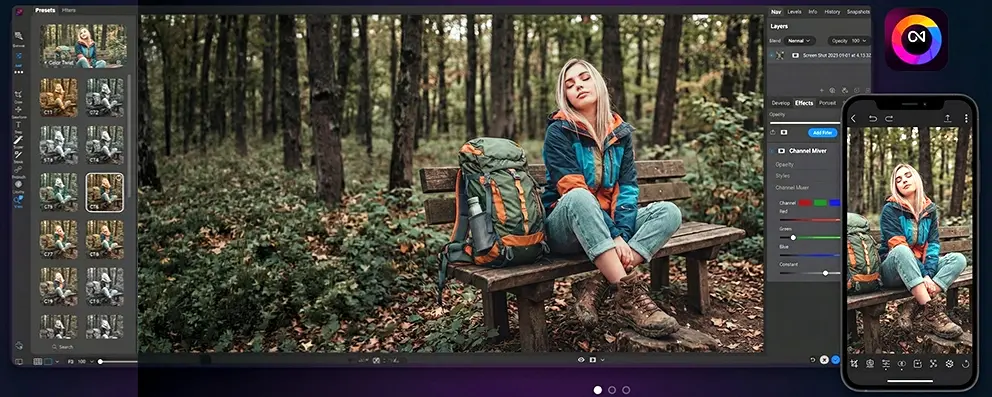
I do a lot of photo editing away from my desk while in the field; that’s where ON1 Photo RAW Mobile proves to be useful. It helps me edit images quickly, whether it’s just a quick crop, exposure setting, or applying a preset before sharing.
This is where RAW Mobile becomes worth considering. It gives phone and tablet photographers more control than a basic editor. Let’s look at what it does well, where it may feel heavy, and who should try it.
Key Takeaways
Best for photographers who want RAW editing control on mobile devices.
AI tools can speed up selective edits on skies and backgrounds.
Cloud Sync helps connect phone, tablet, and desktop editing workflows.
More advanced than casual apps built for quick social-media edits.
What is ON1 Photo RAW Mobile?
ON1 Photo RAW Mobile is a photo editing app designed for both iOS and Android devices, enabling photographers to capture, edit, and organize their photos directly on a phone or tablet.
It is built for RAW editing, manual camera control, local adjustments, and mobile-to-desktop workflows. ON1 says the mobile app uses the same RAW processing engine as its desktop version.
For travel editing, you could adjust a sunset RAW file on an iPad, recover highlight detail, correct colour, crop the frame, and decide whether to finish it later on your desktop
Who should use ON1’s mobile photo editor?
ON1 Photo RAW Mobile is best for those who want more editing control on a phone or tablet than basic camera apps provide.
It is a strong fit for photographers who already use ON1 desktop. You can rate photos on a tablet, make edits, and then finish images later on a larger monitor.
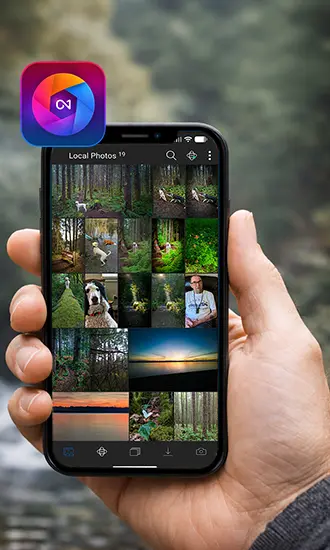
AI Masking and Selective Edits on a Small Screen
AI tools help by making selective edits faster, especially when detailed masking would be awkward on a phone.
ON1 includes Brilliance AI for tones and colour adjustments, along with Super Select AI for tap-based selections. For example, you might tap a bright sky, darken it slightly, then adjust the foreground separately so the whole image still feels natural.
Treat these tools as a starting point, not a finished edit. Zoom in before exporting, especially around skies, tree lines, hair, and high-contrast edges. If you see halos or rough transitions, lower the effect or refine the mask.
ON1 Cloud Sync for Mobile and Desktop Workflows
ON1 Cloud Sync helps connect mobile editing with a desktop workflow.
This is useful when your edit does not happen in one sitting. You might import travel photos to an iPad, rate the best ones on the couch, make rough exposure and colour corrections, and then finish the final images later on your desktop.
ON1 says Cloud Sync can sync photos, edits, albums, presets, and metadata across your desktop and mobile.
Before building your workflow around syncing, check ON1’s current plan details. Plan names, storage amounts, and included features can change.
Practical Downsides for Mobile Photographers
More control means more learning. RAW tools, local adjustments, AI selection, organizing, and syncing can slow you down when a photo only needs a quick crop or exposure fix.
Small screens also limit precision. Masking is easier on a tablet than on a phone, and large RAW files may run better on newer devices.
Storage can grow quickly with RAW files, edits, and synced projects. Before exporting important images, check edges, noise, and sharpness at full size.

A Simple RAW Mobile Workflow
Import or capture a RAW photo. Test the app with real images, such as a low-light shot, backlit portrait, bright landscape, and imported camera RAW file.
Rate the best frames first. Then correct the exposure and white balance before adjusting the shadows, highlights, contrast, and colour.
Use selective edits or AI masking only where needed, such as a bright sky, dark face, or distracting background. Before exporting, check edges, noise, and sharpness at full size.
Best Use Cases vs. Not Ideal For
|
Use Case |
Why it Helps |
What to Watch For |
|---|---|---|
|
RAW edits from a phone |
More control over light and colour |
RAW files use storage quickly |
|
Imported camera files |
Edit away from a laptop |
Older devices may slow down |
|
Travel editing on an iPad |
Cull and edit while away |
Check colour later on a larger screen |
|
Selective sky adjustments |
AI can speed up masking |
Watch for halos along edges |
|
Quick social-media edits |
Good when extra control matters |
|
|
Large synced projects |
Keeps devices connected |
Plan limits and storage matter |
Is this RAW mobile app worth trying?
After weighing the editing control, AI tools, syncing options, and learning curve, ON1 Photo RAW Mobile is worth trying if you regularly edit RAW photos on your phone or tablet.
ON1 Photo RAW Mobile is worth trying if you want RAW editing control away from a computer.
It fits photographers who shoot RAW, import camera files, use ON1 desktop tools, or edit while travelling. It is less useful if most photos only need a crop, brightness fix, and quick export.
Test it with one real photo set. Rate the keepers, correct exposure, try one selective edit, and export a few finished photos.
RECOMMENDED EDITOR
On1 Photo RAW – For when you outgrow the build in phone editor
The mobile editor I reach for my serious shots. Free 30-day trial
Conclusion
ON1’s mobile photo editor is best for photographers who want more control than a casual phone editor provides. Its strengths are RAW editing, selective adjustments, AI-assisted masks, organizing tools, and a connected mobile-to-desktop workflow.
It is not the simplest choice for every image. For quick snapshots, a lighter app may be the better tool. For travel files, imported RAW photos, difficult light, and careful tablet editing, it allows you more room to make thoughtful corrections before you export.
About Bob Wild
Bob is a fine-art photographer on Vancouver Island and the creator of Phone Photo Guide, and the founder of Who Said Photography. He shares practical mobile photography tips based on real shooting situations, including portraits, natural light, composition, and everyday phone editing.