
Why Are iPhone Photos Blurry?
Causes and Fixes to Try

Bob Wild
Fine Art Photographer, Vancouver Island
Founder of Who Said Photography | 20+ years shooting | I try and test every tip on real shoots before it goes on the page

Why are my iPhone photos blurry? Its’ a question I get all the time. In my experience, the answer is usually easier to find once you look at the type of blur, not just the camera settings.
I often see people treat every blurry photo the same, but a smeared photo, shaky photo, soft zoomed photo, and out-of-focus subject all point to different fixes. That’s why this guide starts with a diagnosis first, then walks through the safest things to try before assuming your iPhone camera is broken.
Key Takeaways
Clean the lens first, then test photos in bright natural light.
Remove cases, lens protectors, and accessories that may block the camera.
Tap your subject to check focus before blaming the camera hardware.
Low light makes blur, grain, and camera shake much more likely.
Compare the Camera app with social apps before changing iPhone settings.
What kind of blur are you seeing?
The type of blur usually points to the cause. A smeared photo is often a lens issue, while a sharp background with a soft subject usually means the focus landed in the wrong place.
Look at the photo before trying fixes. Is the whole image foggy? Is only the moving person blurred? Does it happen only when zoomed in? That quick check saves time and helps you avoid changing settings that aren’t related to the problem.
|
Blur Type |
What It Looks Like |
Likely Cause |
First Fix |
|---|---|---|---|
|
Hazy or smeared |
Whole image looks foggy |
Fingerprints or grease |
Clean the lens |
|
Out of focus |
Subject soft, background sharp |
Wrong focus point |
Wrong focus point |
|
Shaky |
Whole image looks blurred |
Phone moved |
Hold steady or brace |
|
Motion blur |
Moving person or pet blurred |
Subject moved |
Use more light |
|
Zoom softness |
Zoomed photo looks soft |
Digital zoom or crop |
Test at 1x |
|
App blur |
Compression or in-app camera |
Use Camera app first |
|
|
Always blurry |
Blurry in bright light too |
Software, obstruction, or damage |
Restart, update, test cameras |
What should you try first?
Start with the easiest checks: clean the lens, remove accessories, take a bright daylight test photo, and compare 1x with zoomed photos. These steps find many common causes without changing anything risky.
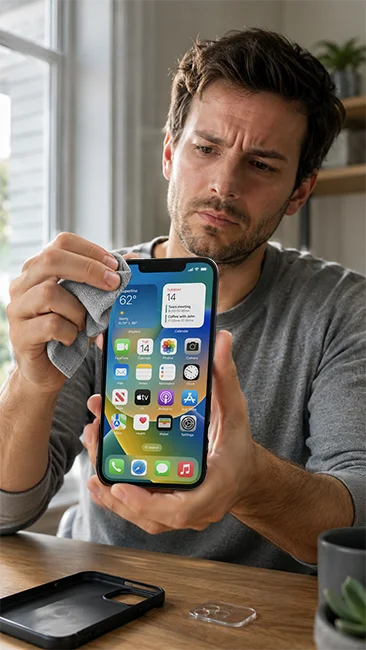
Use a clean microfiber cloth on the front and back camera lenses. Don’t wipe the lens with your fingers, rough fabric, paper towel, harsh cleaners, or liquids. A tiny fingerprint or film of grease can make a photo look hazy even when focus is fine.
Next, remove the case, camera lens protector, magnetic accessory, clip-on lens, or anything near the camera area. These can block part of the lens, reflect light, confuse focus, or make the image look soft.
Take one test photo outside or near a window in bright light. Use the native Camera app, set zoom to 1x, tap a still subject, and hold the phone with two hands. If that photo looks sharp, the camera probably isn’t broken.
Why are clean-lens photos still blurry?
If you’re asking why are my iPhone photos blurry even after cleaning the lens, the real problem may be focus, movement, low light, zoom, or app compression. A clean lens helps, but it doesn’t fix every kind of blur.
Focus problems are common. If the background looks sharper than your subject, tap the subject on the screen before taking the picture. Step back a little too. If you’re too close, the camera may struggle to focus, especially on small objects, food, flowers, pets, or text.
Low light can also make photos look soft or grainy. In darker scenes, the camera needs more light and may use a slower capture. That makes hand movement easier to see. Hold the phone with two hands, brace your elbows, lean against something stable, or move your subject closer to a window or lamp.
Subject motion is different from camera shake. Kids, pets, sports, gestures, and people walking can blur even when your hands are steady. Try taking several photos, asking the person to pause for a second, or moving into brighter light so the phone can freeze motion more easily.

Why do zoomed photos look blurry?
Zoomed iPhone photos often look soft because pinch zoom can crop the image or use less detail than a normal 1x shot. Test the same subject at 1x, then zoom in and compare.
When sharpness matters, move closer instead of using heavy pinch zoom. You can also take the photo at 1x and crop a little after ward. Cropping too much will still reduce detail, but it gives you more control than guessing while zoomed in.
Some iPhone models have different camera lenses, focus behaviour, night mode, stabilization, and close-focus limits. Don’t assume your phone will behave exactly like someone else’s. The useful test is simple: shoot the same subject in bright light at 1x and then at your usual zoom level.
If the 1x image is sharp but the zoomed version is soft, the blur is probably not damage. It’s likely the limits of zoom, cropping, distance, light, or the lens being used.
Check focus before changing settings.
Missed focus often looks like a camera problem, but it can happen in normal use. The easiest fix is to tap the part of the scene that should be sharp.
After you tap, pause for a moment before taking the photo. If the subject moves, tap again. For portraits, tap the face. For products, tap the most important detail. Hold the phone parallel to the surface and keep your distance when photographing documents or text.
Step back and move into better light if the camera continues to hunt back and forth. A little more distance can help the phone lock focus more reliably.
Fix camera shake and low-light softness.
Camera shake usually affects the whole photo. It can show up as a soft, doubled, or streaky image.
Use both hands and keep your elbows close to your body. Brace the phone on a table, wall, railing, or your knee when possible. In low light, take a few extra shots because one may be sharper than the others.
Low light can also create grain. Grain isn’t the same as blur, but it can make detail look rough or soft. Add light when you can, turn your subject toward the light, or move away from very dark corners.
Check apps and iCloud loading.
Sometimes the original photo is fine, but it looks worse in another app. Instagram, Snapchat, TikTok, WhatsApp, and messaging apps may compress images or use their own in-app camera.
Test this by taking the same photo in the native Camera app first. Then upload or send that photo instead of shooting inside the app. If the Camera app version looks sharper, the app workflow may be the issue.
Photos can also appear blurry while they’re still loading, especially when cloud storage or optimized storage is involved. Give the image a moment to load fully before judging sharpness.
Can you fix an already blurry iPhone photo?
You may be able to improve mild softness, but you can’t fully restore detail that wasn’t captured. Sharpening can make edges look clearer, but it won’t truly unblur a badly shaky or out-of-focus photo.
Try small edits in the Photos app, such as sharpening, definition, and contrast. Use a light touch. Too much sharpening can make grain and edges look harsh.
The better fix is usually to retake the photo after finding the cause. Clean the lens, use more light, tap to focus, avoid heavy zoom, and steady the phone.

RECOMMENDED EDITOR
On1 Photo RAW – For when you outgrow the build in phone editor
The mobile editor I reach for my serious shots. Free 30-day trial
Conclusion
The best answer to why are my iPhone photos blurry is to diagnose the blur first, then match the fix to the cause.. A smeared photo, missed focus, shaky frame, moving subject, soft zoom, app-compressed image, and possible camera fault all need different fixes.
Start with the safest checks: clean the lens, remove accessories, shoot in bright light, use 1x, tap your subject, and compare the camera app with other apps. If the camera still looks blurry in bright light after restarting, updating, and testing both cameras, it’s time to get support.
About Bob Wild
Bob is a fine-art photographer on Vancouver Island and the creator of Phone Photo Guide, and the founder of Who Said Photography. He shares practical mobile photography tips based on real shooting situations, including portraits, natural light, composition, and everyday phone editing.