
Taking Photos in the Rain With a Phone: Tips for Clear Shots

Bob Wild
Fine Art Photographer, Vancouver Island
Founder of Who Said Photography | 20+ years shooting | I try and test every tip on real shoots before it goes on the page
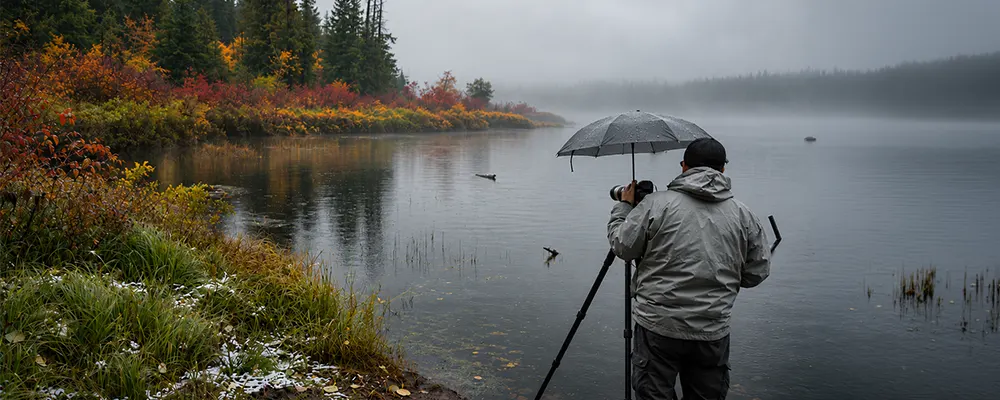
I live here on Vancouver Island, and there’s one thing I know: it’s how to take photos in the rain with a phone. Rain can turn a photo into a soft, grey mess if you’re not careful. Water spots can add strange colours to the details, dim light causes blur, and a wet screen and cold hands make camera controls difficult to use. Learning to shoot in the rain starts with protection a clean lens, steady hands, and clear purpose.
A dry cloth, a covered position, and a strong subject can improve results without a complicated setup. Its easy to take photos in the rain without exposing your phone to the elements.
Key Takeaways
Check your phone’s rating first so you understand its water-resistance limits.
Work from cover whenever possible to protect your phone and improve control.
Wipe the lens often because one droplet can soften the whole frame.
Tap the subject and adjust exposure so bright reflections keep useful detail.
Use dark backgrounds or puddles to make rain easier to see.
How do you protect your phone?
To protect your phone, keep it under cover when not in use and limit its direct exposure to rain. Shooting in wet conditions is easier when you work from a dry location. You might find shelter under a building overhang a car, or you could carry an umbrella. Additionally, consider purchasing a waterproof case or sleeve for your phone. I have to say this again: check your manual to see if your phone is water resistant
Water resistance isn’t the same as waterproofing. Ratings vary by model, seals can weaken with age or damage, and manufacturers warn that liquid damage may not be covered. Check for your exact phone instead of trusting a general claim.
Pack a clean microfibre cloth and a dry pocket or bag. A rain jacket with a secure pocket can help keep your gear sheltered between shots. If the device becomes wet, wipe it with a soft cloth and follow the manufacturer’s drying instructions. Dry off any rain on the outside before putting it away. Don’t connect a cable while the port is wet.
How do you keep the lens clear?
Keep the lens clear by checking it before every short series of photos. Tiny water droplets on the lens cover can spoil an image. Even one raindrop can leave a blurry patch. Blot water away with a clean microfibre cloth, then look across the glass for a smear or remaining drop.
A small droplet can create haze, bright streaks, or a soft patch that editing can’t repair. The preview may hide the problem until you enlarge during post-processing.
Keep the lens pointed down while moving, keeping it protected from the rain. Avoid using a sleeve or tissue; they might just spread the water drops or, worse, leave fibres on the lens. If moisture appears inside the phone case, removing the phone and follow the manufacturer’s instructions for drying.

How should you set focus and exposure?
Tap the main subject to set focus, then adjust the exposure slightly if bright wet surfaces lose detail. On many smartphones, a slider usually appears beside the focus point or inside the camera controls.
Rain scenes might contain deep shadows, pale skies, and sharp reflections. Automatic exposure could brighten the frame and wash out streetlights, windows, or puddle reflections. A small darker adjustment often protects the mood and colour.
Hold your phone with both hands, keeping your elbows close to your body to minimize camera shake. A small tripod can help keep the phone steady for still scenes, especially in low light. A tripod will not stop moving subjects from being blurry. If your photo looks soft, check the lens for water droplets, look for better light, and make sure the phone is steady before trying digital zoom.
Use rain as part of the composition
Choose one clear subject, such as a bright coat, umbrella, bicycle, doorway, or glowing sign. A photographer in a colourful coat or a single splash near a curb can also attract attention. Leave space for streaks, reflections, or mist to show.
Drops on a nearby window can frame a softer street scene, while a covered entrance creates a foreground. Shooting from indoors through a window can be a useful choice during heavy rain or when storm clouds darken the sky. Press the camera lens close to a clean window without pressing hard. This reduces indoor reflections, although it won’t always eliminate them.
|
Rain scene |
Simple approach |
Watch for |
|---|---|---|
|
Falling drops |
Place them against a dark or lit background |
A bright sky that hides the rain |
|
Wet street |
Use signs, headlights, or umbrellas as colour |
Blown highlights and traffic hazards |
|
Puddle reflection |
Lower the phone and simplify the reflected subject |
Stepping into traffic or deep water |
|
Window view |
Focus on drops or the scene, not both |
Glass glare and indoor reflections |

Make raindrops easier to see.
Rain needs contrast or light to appear clearly. These tips for shooting in wet weather also work when rain clouds make the scene look flat. Frame falling drops against trees, dark buildings, or shaded pavement. Side light and backlight from windows, lamps, or vehicle lights can make drops brighter than the background. To backlight the rain, place a light source behind the falling drops rather than pointing the phone straight into it.
With manual shutter control, experiment in small steps. A faster shutter can define drops but darken the photo. A slower shutter creates streaks but increases blur. No setting fits every storm.
Avoid using the flash on your phone to take pictures of the rain. It can turn nearby raindrops into bright spots while your subject is dark. Instead, look for street lights or other lights that illuminate falling rain, especially against a dark background. “If the lighting is not working, try a different angle or wait for better conditions.
Try reflections after the shower.
Make your photos of the rain more intentional by using reflections. Wet streets can give you strong lines and colours without you standing out there in the downpour. Puddles, wet pavement, windows, and people often appear richer in colour when wet compared to grey skies.
- Get the phone low without wet ground.
- Look for a rainbow after the shower.
- Position yourself for a clear reflection.
- Take one picture of the subject and one of its reflection.
Follow a quick rain photo routine.
Use the same short routine each time so wet conditions don’t make you rush. In rainy weather, a simple plan makes it easier to concentrate on the picture.
- Check the forecast, phone rating, case, and safe shelter options.
- Choose a covered position before using the camera.
- Dry your hands and clean the lens.
- Pick one subject with colour, shape, or useful light.
- Tap to focus, adjust exposure, and hold the phone steadily.
- Take a few frames, inspect one closely, and reshoot if necessary.
- Put the phone away before moving across slippery or busy ground.
Review the photos somewhere dry. In post-processing, start with the photo that has the clearest subject and best light. Make small edits to exposure, highlights, shadows, contrast, and colour. Heavy clarity or saturation can make wet surfaces look harsh.
Keep Learning
Your next move with the camera
You’ve got the controls. These are the guides I’d hand you next. Each one picks up where the other left off. Written from the same real photo shoots
-
Common Mistakes Mobile Photographers Make for Beginners
Common Mistakes Mobile Photographers Make: Beginners Guide Common mistakes mobile photographers make often has less to do with…
-
Flower Photos With Phone: Beautiful Flower Photography Tips
Flower Photos With Phone: Beautiful Flower Photography Tips Flower photos with phone can turn out wonderful, but have…
-
How To Adjust Exposure on iPhone Before You Take the Shot
How To Adjust Exposure on iPhone Before You Take the Shot I learned how important it is to…




RECOMMENDED EDITOR
On1 Photo RAW – For when you outgrow the build in phone editor
The mobile editor I reach for my serious shots. Free 30-day trial
Conclusion: Better rain photos
Good rain photography comes from confidence and composition, not from standing in the heaviest downpour. Protect your camera from spray and avoid getting wet just to get a better shoot. Protect the device, keep the lens clean, choose a clear subject, and use dark backgrounds or reflections to show the weather. With this routine, photos in the rain with a phone can look deliberate without putting you or the device at needless risk.
About Bob Wild
Bob is a fine-art photographer on Vancouver Island and the creator of Phone Photo Guide, and the founder of Who Said Photography. He shares practical mobile photography tips based on real shooting situations, including portraits, natural light, composition, and everyday phone editing.